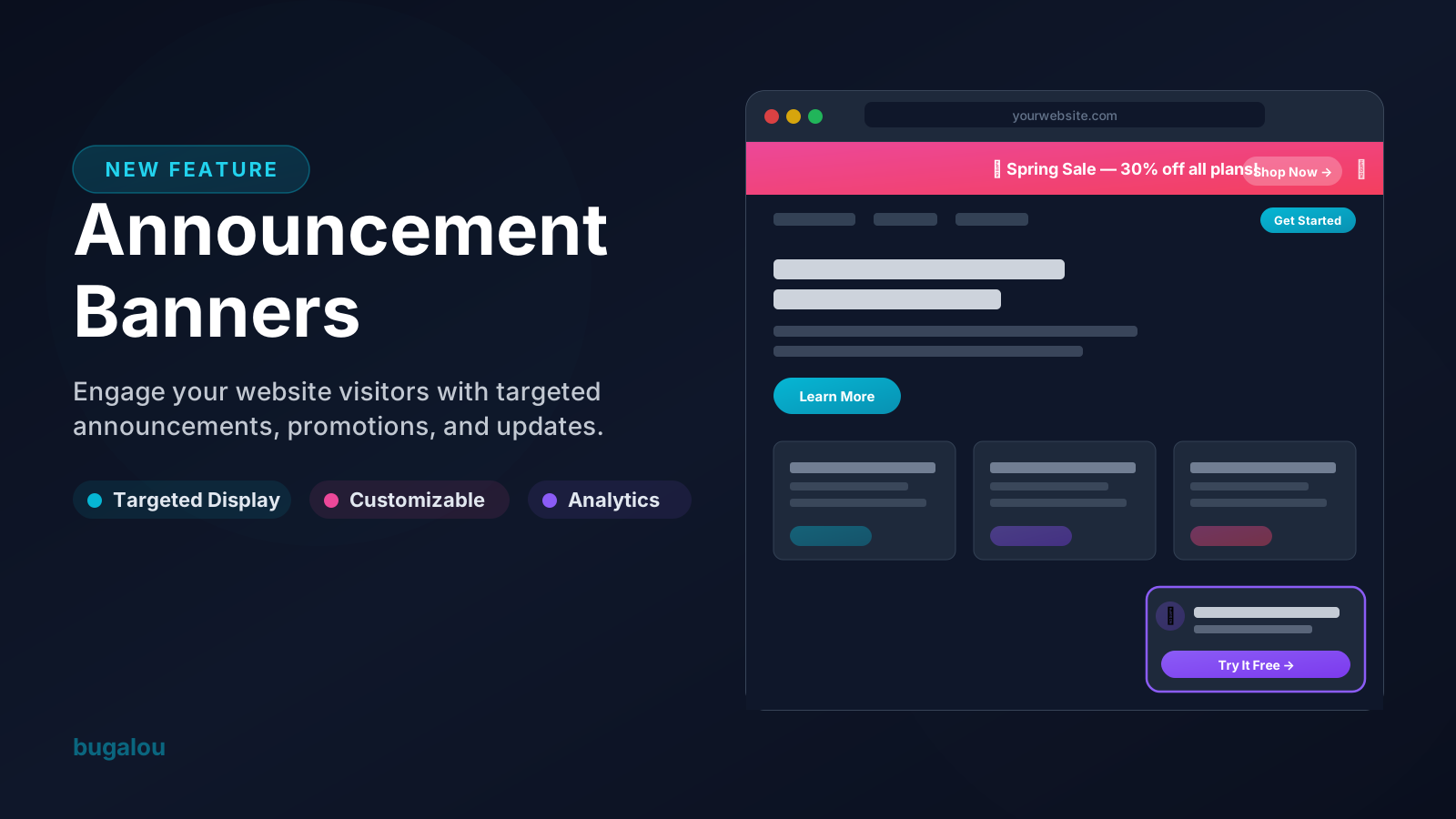
Announcement Banners are here! This powerful new feature lets you display eye-catching banners on your website to promote offers, share important updates, or drive action — all without writing a single line of code.
What Are Announcement Banners?
Announcement Banners are customizable notification bars and floating banners that appear on your website. Think of them as your direct line of communication with every visitor, right where they're already browsing.
Whether you want to highlight a seasonal promotion, announce a new product launch, or simply keep your visitors informed about maintenance schedules — Announcement Banners make it effortless. With the ability to engage users directly, these banners can significantly enhance user experience and conversion rates.
How to Use Announcement Banners Effectively?
To maximize the effectiveness of your Announcement Banners, consider these strategies:
Define Your Goals
Before creating a banner, clarify what you want to achieve. Is it increased sales, more newsletter sign-ups, or promoting an event? Clear objectives will guide your design and messaging.
Choose Attention-Grabbing Designs
Utilize bold colors and engaging visuals to make your banners stand out. Use high-quality images or graphics that resonate with your message. For instance, a travel agency might use stunning destination images to capture attention.
Incorporate a Clear Call to Action (CTA)
Your banner should prompt users to take action. Use clear and concise language for your CTA, such as "Get 20% Off Today!" or "Sign Up Now!" A well-defined CTA can significantly enhance engagement rates.
Utilize A/B Testing
Test different versions of your banners to see which performs better. Experiment with different colors, texts, and placements. A/B testing helps you understand what resonates with your audience, allowing for continuous optimization.
Regularly Update Content
Keep your banners fresh and relevant by updating them regularly. Rotating offers or seasonal promotions can keep returning visitors engaged and encourage them to take action.
Key Features
Visual Editor with Live Preview
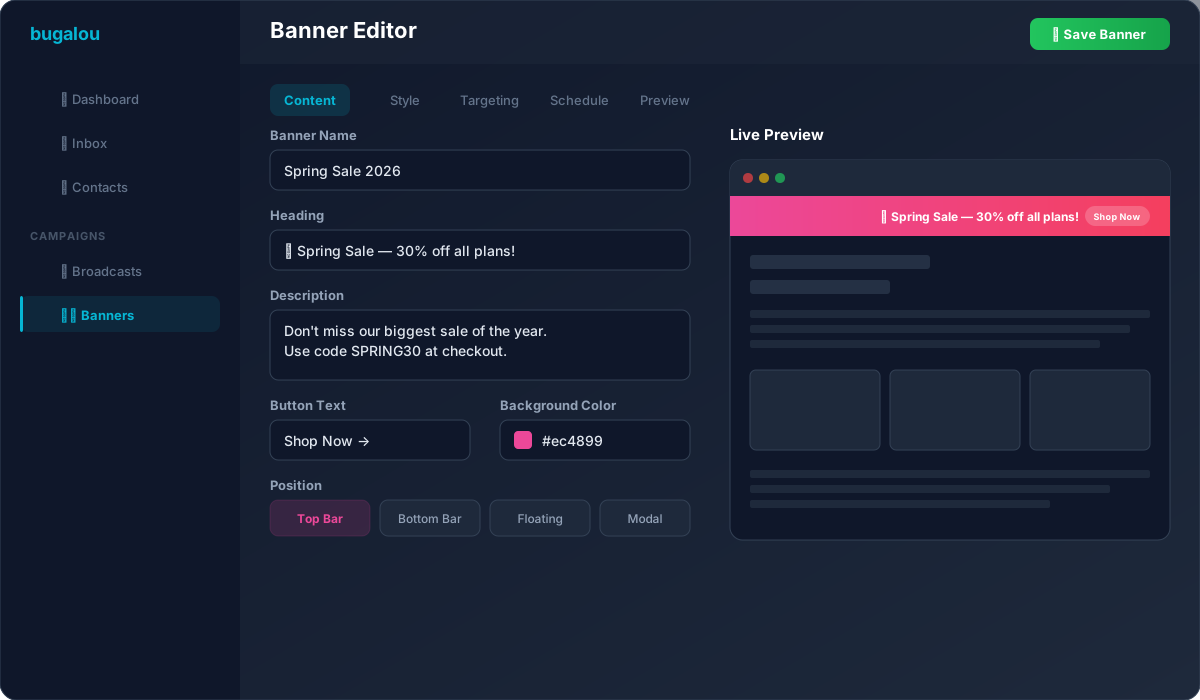
Build your banners using our intuitive 5-tab editor. Choose your content, pick colors and styles, set targeting rules, schedule delivery, and preview everything in real-time — all from one screen. This visual editor allows you to unleash your creativity while ensuring that the banners align with your brand identity. The real-time preview feature ensures that you can see how your banner will look on your website before it goes live, which helps in making instant adjustments.
For instance, if you are running a winter sale, you can easily create a banner with snowy graphics and a festive color palette, ensuring it resonates with the season and catches the eye of your visitors.
Multiple Banner Positions
Place your banners exactly where they'll have the most impact:
- Top Bar — A slim, full-width bar at the top of the page. Perfect for promotions and announcements.
- Bottom Bar — A fixed bar at the bottom. Great for cookie notices or persistent CTAs.
- Floating Banner — A floating card that appears in the corner. Ideal for limited-time offers and subtle nudges.
By strategically placing your banners, you can guide visitors' attention to key messages and improve engagement. For example, a top bar can be a constant reminder of a time-sensitive offer, while a floating banner can gently encourage users to take action without being intrusive.
Smart Targeting & Scheduling
Show banners to the right people at the right time. Target by page URL, device type (desktop or mobile), and set start/end dates so your banners go live and expire automatically. This targeted approach ensures that your messages are relevant, which can significantly increase engagement rates.
For example, if you run an e-commerce site, you might want to show a banner promoting a discount on shoes only to visitors who are browsing the footwear category. This level of customization helps create a personalized shopping experience that can lead to higher conversion rates.
Built-in Analytics
Track how your banners perform with real-time analytics. Monitor impressions, clicks, click-through rates (CTR), and dismissals — all displayed in a clean analytics dashboard. Understanding how your banners are performing allows you to make data-driven decisions to optimize your campaigns.
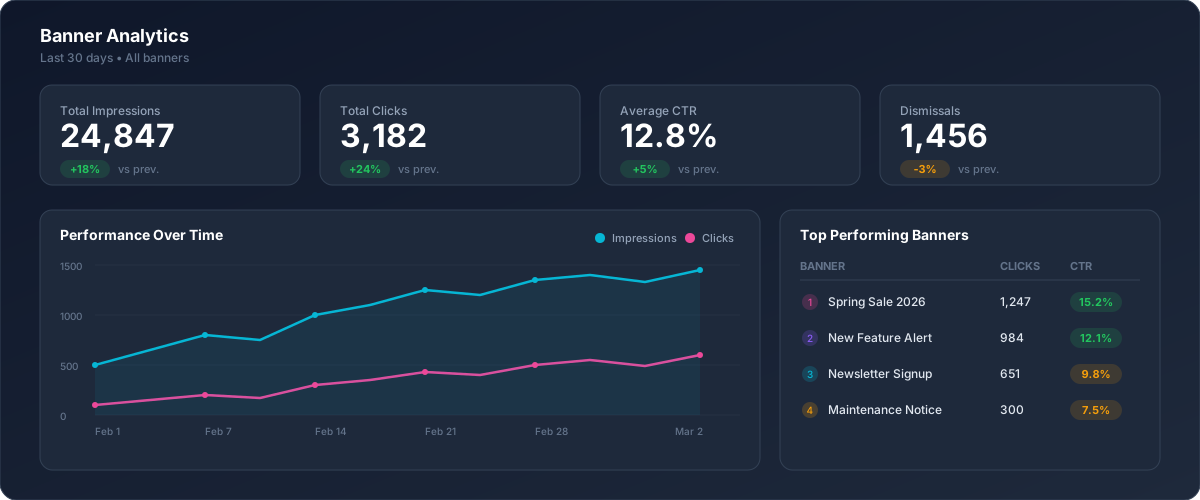
For instance, if you find that a particular banner has a high click-through rate but a low conversion rate, it may indicate that while the banner is enticing, the landing page it directs to may need improvement.
How Do Announcement Banners Improve Customer Engagement?
Announcement Banners can drastically enhance customer engagement in several ways:
Immediate Communication
Announcement Banners provide a direct channel for communicating with visitors. Whether it's a flash sale or an important update, these banners ensure that your message reaches your audience immediately.
Enhanced User Experience
By providing timely information and promotions, you improve the overall user experience. Customers appreciate being informed about new products or services, which can lead to increased satisfaction and loyalty.
Encouragement of Action
Effective banners encourage visitors to take action, whether it’s making a purchase, subscribing to a newsletter, or following your social media accounts. The right message at the right time can convert a casual visitor into a loyal customer.
Visual Appeal
Well-designed banners enhance the visual layout of your website, making it more engaging. A visually appealing site can reduce bounce rates and encourage visitors to explore further.
Getting Started
Setting up your first banner takes less than five minutes:
- Navigating to Campaigns → Banners in your Bugalou dashboard.
- Click "Create Banner" to open the editor.
- Add your content — headline, description, and optional call-to-action button.
- Style it — pick colors, border radius, choose a position (top bar, bottom bar, or floating).
- Set targeting — choose which pages and devices to show it on.
- Schedule or publish — go live immediately or set a date range.
- Embed the widget — add one line of JavaScript to your website.
That's it. Your banner is live and tracking analytics from the moment it appears. This straightforward process allows even those with minimal technical knowledge to create effective banners that can enhance user engagement.
Practical Tips for Creating Effective Announcement Banners
Creating an announcement banner is one thing; creating an effective one is another. Here are some practical tips to ensure your banners achieve their intended goals:
- Keep It Simple: Avoid cluttering your banner with too much text or too many visuals. A clear and concise message is more likely to grab attention.
- Use Action-Oriented Language: Phrases like “Shop Now,” “Learn More,” or “Get Started” can encourage users to take action.
- Make It Visually Appealing: Use colors that align with your brand but also stand out on the page. High contrast can help your banner catch the eye.
- Test Different Variations: Use A/B testing to see which banner designs, texts, or placements yield better results. This experimentation can lead to improved engagement and conversion rates.
- Update Regularly: Keep your content fresh. Regular updates can keep returning visitors engaged and informed about new offers or changes.
Who Can Use It?
Announcement Banners are available on all paid plans — Starter, Pro, and Enterprise. Whether you're a small business or an established enterprise, you can start using banners today. This accessibility means that no matter your business size, you can leverage this feature to enhance your customer communication.
Frequently Asked Questions
What are the best practices for creating announcement banners?
Best practices include keeping messages clear and concise, using strong visuals, incorporating a clear call to action, and regularly updating content to keep it fresh.
How can I track the performance of my announcement banners?
You can track banner performance using built-in analytics that monitor impressions, clicks, click-through rates, and dismissals in your dashboard.
Can I customize the design of my announcement banners?
Yes, the visual editor allows you to customize colors, styles, positions, and more to ensure your banners align with your brand identity.
How do I ensure my announcement banners are effective?
To ensure effectiveness, define clear objectives, use A/B testing, and monitor analytics to understand what works best for your audience.
What are the benefits of using announcement banners?
Benefits include immediate communication with visitors, enhanced user experience, encouragement of user action, and improved visual appeal of your website.
Are announcement banners suitable for all types of businesses?
Yes, announcement banners are versatile and can be used by businesses of all sizes and industries to enhance customer communication and engagement.
Related topics
- Team Inbox — Manage all channels from one inbox
- AI Agent — Automate customer service with AI
- Automations — Build smart workflows
- Chatbot — Automatic 24/7 responses
- Help Center — Build your knowledge base
- Pricing — View our plans

Founder of Bugalou and e-commerce entrepreneur. As a business owner, I noticed that customer service tools were either unaffordable or so complex you needed an IT department. That frustration led to Bugalou.