Team Inbox

One inbox, every channel

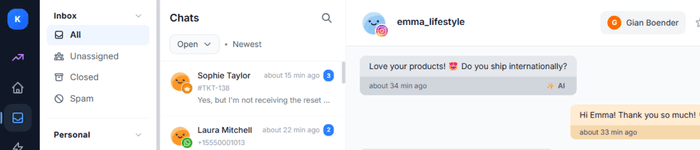
All customer conversations in one place. WhatsApp, Instagram, Messenger, email, VoIP and website chat - unified in one streamlined inbox for maximum efficiency.

Inbox
Chats
RG
Rachel Green17:48

When will I get my tracking code?

2
SJ
Sarah Johnson17:31

Thanks, I'll wait for it!

CL
Christopher Lee17:30

Awesome, thank you! 🎉

FL
fashion_lover_8817:25

Just ordered! Can't wait! 🛍️

1
DB
Daniel Brown17:15

How can I reset my password?

BC
Brandon Clark17:10

Awesome! Thanks so much! 👍

KM
Kevin Miller16:48

My order was cancelled. Refund?

Select a conversation

All channels connected

All communication channels in one inbox

Messages from every platform automatically flow into one streamlined inbox

WhatsApp icon
WhatsApp
Messenger icon
Messenger
Instagram icon
Instagram
VoIP
Website Chat icon
Website Chat
Email
Unified Team Inbox
Features

Everything your team needs

Powerful tools that make collaboration effortless

All channels in one inbox

WhatsApp, Instagram, Messenger, email and website chat — all in one place for maximum overview.

Assign conversations

Distribute work automatically or manually. Each team member gets the conversations they excel at.

Internal notes

Share information with your team without customers seeing it. Perfect for context and handoffs.

Real-time notifications

Never miss a message. Get instant alerts when new conversations come in.

Complete history

All customer interactions neatly stored. See the context of previous conversations instantly.

Team analytics

See how your team performs. Response times, handled conversations and more in one overview.

SLA timers

Set response and resolution targets per priority. Get alerts before deadlines expire.

Bulk actions

Select multiple conversations at once and perform actions like assign, close or label.

CSAT surveys

Collect customer satisfaction after every conversation. Measure service quality with one click.

Custom ticket forms

Create tailored intake forms for different request types. Collect structured data with custom fields in your widget and helpcenter.

Translate before sending

Type your reply in your own language and translate it to the customer's language before you hit send.

Snippets & quick replies

Save common responses as snippets. Type / and select — save time on every reply.

Use Cases

Perfect for every team

Whether you're a small team or a large organization, Team Inbox scales with you

E-commerce teams

Handle questions about orders, returns and products from one central inbox.

  • Order status & delivery info
  • Return & exchange policy
  • Product recommendations
View Chatbot

Support teams

Manage tickets from all channels in one place. Assign to specialists and keep overview.

  • Multichannel support
  • Ticket assignment
  • SLA timers & CSAT
View AI Agent

Marketing teams

Respond directly to social media messages and leads from all channels in one overview.

  • Social media management
  • Lead follow-up
  • Campaign responses
View Broadcasts
3 steps

Your team inbox in 3 steps

From separate channels to one powerful team inbox in minutes.

01

Connect channels

Link email, live chat, WhatsApp, Instagram, Messenger and more to your shared inbox in a few clicks.

Step 01
02

Invite your team

Add team members, set roles and configure automatic assignment rules so every ticket reaches the right agent.

Step 02
03

Start collaborating

Work together on tickets, share internal notes and track performance with real-time analytics and reporting.

Step 03
Benefits

Results that make the difference

40% faster response time

No more app-switching. All messages in one inbox for faster handling.

0 missed messages

Every channel comes together in one clear inbox. No message goes unanswered.

7+ channels in one inbox

From WhatsApp to email, from Instagram to VoIP — everything in one place.

Scalable with your team

From 1 to 100+ team members. The inbox grows with you without adding complexity.

40%

Faster response time

24/7

Always available

7+

Channels in one inbox

Scalable with your team

Integrations

Works with your favorite platforms

Integrate with WordPress, WooCommerce, Shopify, Lightspeed, Magento and more

WordPress logoWordPress
WooCommerce logoWooCommerce
Shopify logoShopify
Lightspeed logoLightspeed
Magento logoMagento
Custom API
FAQ

Frequently asked questions

Everything you need to know about the team inbox

What is a team inbox?
A team inbox is a shared workspace where your entire support team can view, manage and respond to customer messages from all connected channels — email, live chat, WhatsApp, social media and more — all in one place.
How many team members can use the inbox?
There is no limit on the number of team members. You can invite as many agents as your plan allows and easily scale up as your team grows.
Which channels can I connect?
You can connect email, live chat, WhatsApp Business, Facebook Messenger, Instagram DMs and more. All messages arrive in the same unified inbox regardless of the channel.
Can I assign tickets to specific team members?
Yes. You can manually assign tickets or set up automatic routing rules based on channel, topic, language or team member availability to ensure the right person handles each conversation.
Does the team inbox support internal notes?
Absolutely. Team members can leave internal notes on any conversation that are visible only to your team — perfect for sharing context or handover information.
Can I track my team's performance?
Yes. The dashboard provides real-time analytics on response times, resolution rates, ticket volumes and individual agent performance so you can continuously improve your support quality.

Ready to empower your team?

Join companies taking their customer service to the next level with Unified Team Inbox. No credit card required.

Bugalou Dashboard - All your customer conversations in one place