Automate WhatsApp communication
Save hours per week with smart automations. No credit card required.. From order confirmations to track & trace updates - everything automatic via WhatsApp.
New order received
Hi {{1}}, Your order *{{2}}* is on the way. Track & Trace:...
Wait 24 hours
Send review request
"vip-customer" if amount > €50
Works with all your favorite platforms
Connect WhatsApp with WordPress, WooCommerce, Shopify, Magento and more
 WordPress
 WooCommerce
 Shopify
 Magento
Why automate WhatsApp?
Save time, increase customer satisfaction and grow your revenue
Automatic messages
Automatically send order confirmations, shipping notifications and updates to your customers — no manual effort needed.
Status updates
Keep customers informed in real-time about their orders with track & trace integration. Fewer questions, more trust.
Time-based triggers
Send reminders for appointments, abandoned carts or follow-ups automatically at exactly the right moment.
See it in action
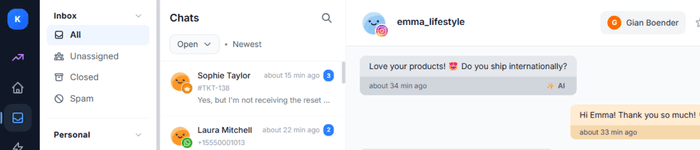
Real examples of automated WhatsApp messages sent by businesses using Bugalou
...
...
...
...
...
...
Popular use cases
See how other businesses automate WhatsApp
E-commerce
Order confirmations, shipping notifications and tracking updates automatically via WhatsApp.
- Order tracking & delivery status
- Return & exchange requests
- Product recommendations
Appointments
Automatic reminders for appointments and ability to cancel or reschedule.
- Appointment reminders
- Confirmations & cancellations
- Follow-up messages
Marketing
Personalized campaigns and offers directly to your target audience.
- Broadcast campaigns
- Personalized offers
- Abandoned cart messages
Automate in 3 simple steps
From connecting WhatsApp to your first automated message in minutes
Connect WhatsApp Business
Connect your Meta Business account directly via the official WhatsApp Cloud API. No middleman — we guide you step by step.
Build your automations
Use the visual builder or choose from templates. Set triggers like new orders, appointments or keywords to send messages automatically.
Go live & monitor
Activate your automations and track delivery, open rates and customer responses in real-time from the dashboard.
Results that convince
Discover why businesses choose WhatsApp automation
Open rate
Delivery speed
Less manual work
Always active
Reach hundreds of customers in one click
Beyond individual automations, Broadcasts let you send bulk messages to all your contacts at once — via WhatsApp or SMS. Perfect for promotions, announcements, and seasonal campaigns.
Choose channel
WhatsApp or SMS
Compose message
Select template or write SMS
Select audience
All contacts, tags, or lifecycle stage
Send or schedule
Immediately or at a scheduled time
847
Sent
831
Delivered
16
Failed
Frequently asked questions
Everything you need to know about WhatsApp automations
Do I need WhatsApp Business API?
What types of messages can I automate?
Are there message template requirements?
How do customers opt in for WhatsApp messages?
Can I combine WhatsApp with other channels?
What is the WhatsApp 24-hour messaging window?
Start with WhatsApp automation
Improve your customer communication and save time with smart automations. No credit card required.