Automate every channel in one place
Build smart workflows across WhatsApp, email and your webshop. From order confirmations to follow-ups and abandoned cart reminders — everything runs on autopilot.
New order received
Hi {{1}}, Your order *{{2}}* is on the way. Track & Trace:...
Wait 24 hours
Send review request
"vip-customer" if amount > €50
Automate every channel from one place
Build smart workflows via WhatsApp, email and your webshop — everything runs on autopilot
Order confirmations, shipping updates, reminders and marketing campaigns via WhatsApp — straight to your customer's phone.
Transactional emails, review requests, welcome series and re-engagement campaigns — all on autopilot.
Webshop
Trigger automations from WooCommerce, Shopify, Lightspeed or Magento order events. Connect your store in minutes.
Works with your favorite platforms
Connect your webshop and start automating in minutes
 WordPress
 WooCommerce
 Shopify
 Lightspeed
 Magento
How it works
Fully automate your customer communication in three steps
Connect your channels
Link WhatsApp, email, Instagram, Messenger and your webshop in a few clicks. All channels in one place.
Build workflows
Create visual flows with triggers, conditions and actions. Set up order confirmations, follow-ups and reminders without code.
Go live & monitor
Activate your automations and track real-time results. Optimize flows based on performance and customer responses.
See it in action
Real automated messages sent by businesses using Bugalou

Automatic order confirmation with product details and tracking info via WhatsApp.

Customers automatically receive shipping updates with track & trace links.
Results that convince
Discover why businesses choose automation
Workflow success rate
Less manual work
Channels supported
Always active
Frequently asked questions
Everything you need to know about automations
Do I need coding skills to set up automations?
Which triggers are available?
Can I create multi-step automations?
How do automations work with WhatsApp?
Can I test automations before activating them?
Are there limits on the number of automations?
Ready to automate your business?
Start free today and build your first automation in minutes. No credit card required.
Combine Automations with other Bugalou features
Automate more than tasks — the whole platform works together
Team Inbox
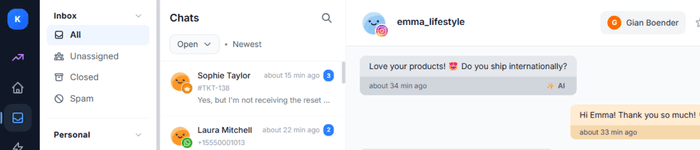
Automate assignments, tags and follow-ups directly from your shared inbox.
View Team InboxBoards
Let automations create, move and assign tasks on your boards.
View BoardsAI Agent
Combine AI responses with automations for complete assistance without human intervention.
View AI AgentChatbot
Connect chatbot conversations to automations for seamless follow-up sequences.
View ChatbotBroadcasts
Set up automatic follow-up flows after your broadcasts for maximum conversion.
View Broadcasts