Organize your team’s work in one place
Boards brings task management directly into Bugalou. Create boards, assign tasks, set priorities and due dates — and link every task to a customer conversation.
Follow up: order #8821
highRefund request — John D.
urgentCheck delivery status
normalUpdate FAQ: return policy
lowWhat can Boards do for you?
Everything your team needs to stay organized — built right into Bugalou
Kanban, List & Calendar
Switch between three views depending on how your team works. Drag and drop in Kanban, bulk edit in List, visualize deadlines in Calendar.
My Tasks
Every agent has a personal task view — My Tasks — showing all tasks assigned to them across every board, filtered by Today, Overdue, or Done.
Import & Export CSV
Import tasks in bulk from a spreadsheet to get started quickly. Export the full board as CSV for reporting or backup.
A full-featured task manager — built right into Bugalou
No separate app, no context switching. Boards lives right inside your customer service platform.
Follow up: order #8821
Refund request — Sandra V.
Update return policy FAQ
Check delivery #2210
Respond to Trustpilot review
Why use Boards?
No more missed follow-ups
Every task is tracked, assigned and dated. Your team never forgets a follow-up or escalation again.
Context stays with the customer
Tasks linked to conversations keep all context in one place — no switching between tools.
Full visibility across the team
See who is working on what, what's overdue, and what's been completed — across every board and every team.
Works the way your team works
Prefer cards? Use Kanban. Need a list? Switch to List view. Planning by date? Calendar view has you covered.
Views: Kanban, List & Calendar
Boards & tasks per workspace
Linked to customer conversations
Available on Pro & Enterprise
Up and running in minutes
From creating your first board to closing your first task in under 5 minutes
Create a board
Give your board a name, pick a colour and emoji, choose a team or start from a template. Takes less than a minute.
Add columns & tasks
Set up your workflow stages as columns — e.g. To Do, In Progress, Done. Then add tasks directly or import from CSV.
Assign & track
Assign tasks, set due dates and link to conversations. Track progress in Kanban, List or Calendar view.
Available on Pro and Enterprise plans
How teams use Boards
Boards adapts to any team workflow — from support to sales to operations
Customer Support
Track escalations, follow-ups and refund requests. Link every task to the customer conversation so nothing gets lost.
- Follow-up tasks after conversations
- Escalation tracking & resolution
- Refund and complaint workflows
Onboarding & Projects
Guide new customers through onboarding steps or manage internal projects with clear milestones and owners.
- New customer onboarding checklists
- Internal project milestones
- Team sprint planning
Sales & Lead Follow-ups
Assign follow-up tasks to sales agents, track deal stages and set reminders to reach out at the right time.
- Lead follow-up pipeline
- Deal stage tracking
- Reminder tasks with due dates
Frequently asked questions
Everything you need to know about Boards
Which plans include Boards?
How many boards can I create?
Can I link a task to a customer conversation?
Can I import tasks from a spreadsheet?
Is Boards visible to customers?
Can I assign a board to a specific team?
Ready to keep your team organized?
Start a free trial today. Boards is included in the Pro and Enterprise plans — no extra cost.
Combine Boards with other Bugalou features
Get more done by connecting Boards to the rest of the platform
Team Inbox
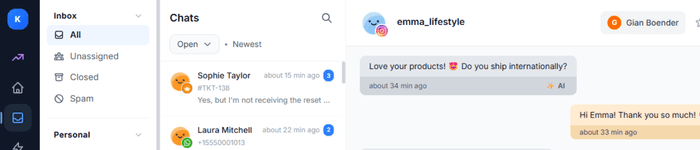
Create tasks directly from customer conversations and link them to contacts for full context.
View Team InboxAutomations
Automate task actions: set due dates, assign or move tasks based on triggers.
View AutomationsAI Agent
Let AI automatically convert incoming requests into tasks on your board.
View AI AgentTeam chat
Create a task straight from a chat message and hand out to-dos with buttons.
View Team chat