Product Updates
Discover the latest features, improvements and updates we've added to Bugalou.
Return reasons per product
When the AI agent takes return requests in the chat, the customer picks a reason per product from your list. Under Analytics > Returns you now see which products keep coming back and why, with a monthly trend. When one reason keeps coming back for a product, you get a tip to review its product page. On the return card in your inbox you see per product how many return requests there were in the last 90 days and the most common reason, and how many requests this customer made this year. Only return requests made in the chat count; returns filed directly in a return portal are not included. Works with Shopify, WooCommerce and Lightspeed.
Suggestions: everything to improve in one place
The new Suggestions page brings together everything Bugalou found to improve, and you handle it right there. New are suggested snippets: replies your team kept typing in the last 30 days that aren't a snippet yet, with names, order numbers and addresses already as variables. Plus questions the AI agent could take over, rules for what your team assigns or labels by hand, WhatsApp messages often sent too late, and help center searches without a result. Bugalou looks again every week, or right away with Search now. And you can ask Copilot too: "Which snippets am I missing?"
Tips and suggestions: Bugalou watches along and suggests what could go faster
While a customer waits for an answer, you see a snippet or help article that fits the question above the reply field, an order number to look up or the question to ask for one, and after a thank-you the button to close the conversation. When your team often sends the same reply, Bugalou suggests saving it as a snippet, and when you promise to get back, you set a reminder in one click. On Pro and Enterprise you also see which questions the AI agent could take over, the AI writes drafts for help center searches without a result, and Bugalou suggests routing rules based on what your team keeps assigning or labelling by hand. It all comes together in the new Suggestions this week block on your dashboard. When the same customer has another open conversation, you merge them in one click. When the customer says they will come back to it, you snooze the conversation until they reply. And WhatsApp messages your team often sends too late, Bugalou suggests as a template. A tip never changes anything by itself.
Topics: choose what your AI agent responds to
Let your AI agent answer only the topics you choose, for example cancellations and returns, and decide per topic where the rest goes: just in the inbox, to a team or colleague, or with a label. Add your own topics, choose which channels it applies to and test a message before you turn it on. If the AI gets it wrong, correct it in one click and it follows that from then on. Per topic you can also have the AI ask for the order number first, before your team takes over. In the inbox you see why the AI left a message, and under Numbers which topics it could take too.
Returns via the AI agent, and refunds from your inbox
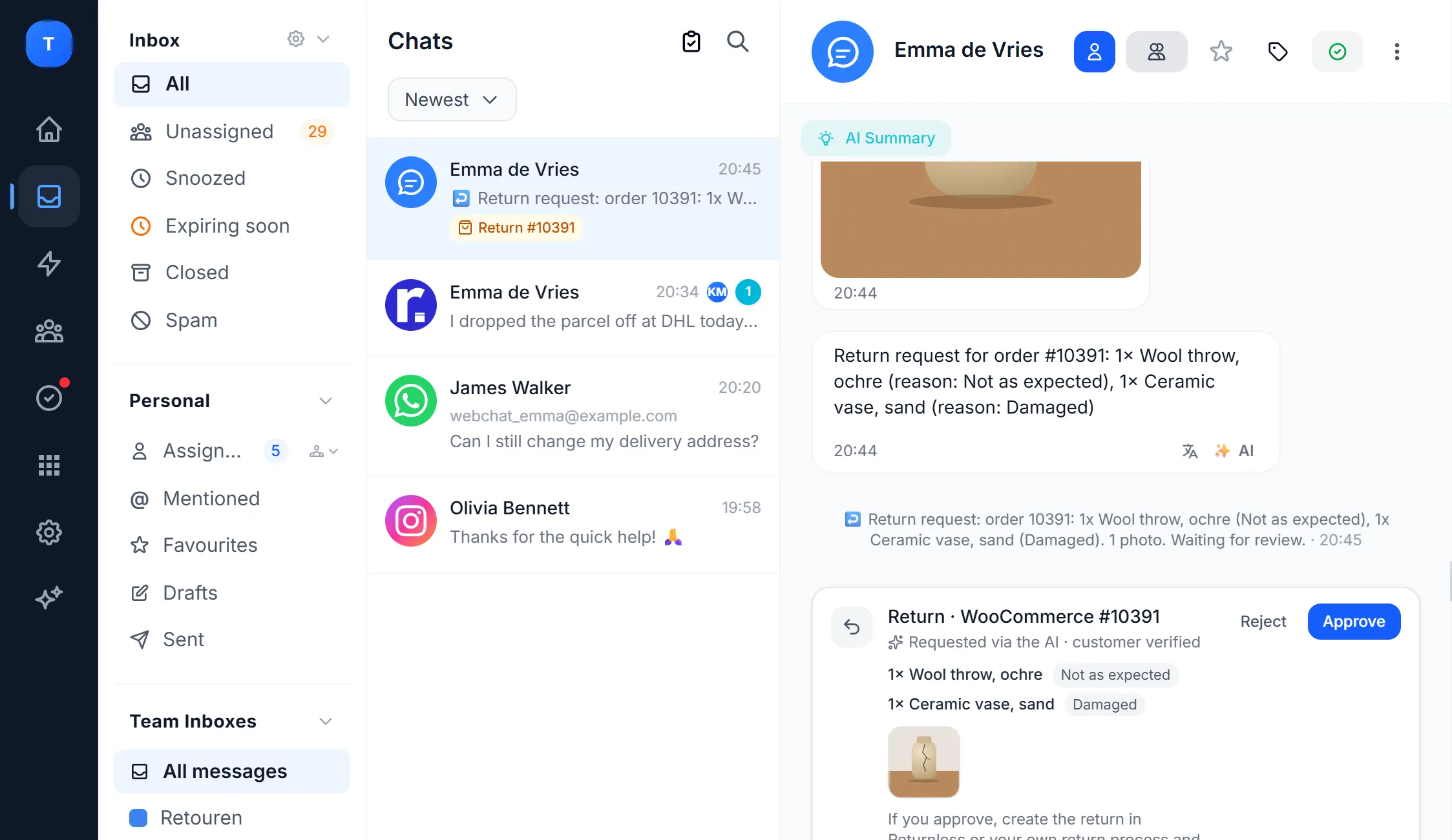
The AI agent now also takes return requests, on every channel. You choose your return window and the reasons. The customer shows that the order is theirs, picks the products with a reason for each and sends at least one photo. In the website chat this happens in a form. Only shipped products within your window; if the order hasn't shipped yet, the AI offers to cancel it. Every request lands in your inbox as a card, with the photos and the amount, and you approve or reject it. If you choose to refund in Bugalou, you click Received, refund once the parcel is in, per product and optionally with shipping (Shopify and WooCommerce). The AI can now also cancel part of an order, and a customer can withdraw a request as long as your team hasn't handled it yet.
A new dashboard and the Bugalou Academy
The dashboard has been redesigned: at the top the numbers that matter (conversations this month per channel, open, unassigned and answered), below that your team, your tasks, your notifications and what you missed from your colleagues: per person how many team chat messages and mentions you haven't seen yet. With Customize you arrange the dashboard yourself: drag and hide blocks, saved per user. Also new is the Academy, with short video lessons. The first route, Getting started, takes you in six lessons from your first channel to your AI agent and your team, with a badge when you're done.
A calmer, refreshed inbox
The inbox looks calmer: customer messages in white bubbles on a light grey conversation, rounded corners, events such as assigning and closing as a quiet timeline line, and a white side panel with the customer details. In the conversation list you see for WhatsApp, Instagram and Messenger how much time you have left to reply. An expired 24-hour window is one line above the composer, with the button to send a template. Closing, assigning, labelling and bulk actions get a short animation and a confirmation, and new messages slide smoothly into view.
A faster, smarter AI agent and ready-made WhatsApp texts
The AI agent searches faster and more precisely through all your website pages, blogs and knowledge, and the first word of its answer appears within about a second, on every channel. The Pro recipes in Automations now come with a standard WhatsApp text you submit to Meta from the builder in one click, so they also arrive outside the 24-hour window. In the WordPress plugin Bugalou for WooCommerce (1.2.0) you can switch off a WooCommerce email that Bugalou already sends via WhatsApp, so your customer doesn't get anything twice.
The WhatsApp Business app and Bugalou together
You can now connect your WhatsApp number while it keeps working in the WhatsApp Business app on your phone. Messages you send or receive on your phone also show up in Bugalou, so your team sees everything. You can also connect several WhatsApp numbers to one workspace and see per conversation which number it came in on.
Away message on every channel
The away message from your Workspace preferences now actually reaches the customer, on the channel they wrote on: email, WhatsApp, Instagram, Messenger or your website chat. At most once every 4 hours per conversation, and never to no-reply addresses or other automatic replies. Story mentions, story replies, shared posts, reels and photos in the inbox also show as neat cards now. Turn on the away message under Workspace preferences, together with your business hours.
Banners with countdown, coupon codes and email capture
Announcement banners got a big upgrade: a countdown timer, a coupon code visitors copy with one click, email capture with a consent line and a link to your privacy policy (the consent is stored on the contact), a button that opens the chat, gradients, animations and ready-made templates. The chat widget loads your banners automatically. On the free plan you can create one basic banner.
Social media planner
Schedule and publish posts on Instagram, Facebook and TikTok from Bugalou, with a content calendar, AI captions, the best time to post and social analytics. The planner is a €24/month add-on on every paid plan, and you can try it free during your trial.
Post comments in the inbox
Comments under your Instagram and Facebook posts arrive in your inbox, in the same conversation as that person's DMs, with the post attached. Reply publicly under the comment, like it, or hide, delete or edit it. You also see when a customer likes a message. Comments don't count as conversations and are included in every paid plan.
Free plan
Start with Bugalou for free: live chat on your website for 1 user and up to 50 conversations a month, with no time limit and no credit card. Upgrade in one click to Starter or Pro for WhatsApp, email, Instagram, AI and more users.
WooCommerce orders in the inbox
Next to a conversation you now see that customer's WooCommerce orders in the sidebar, with product images, status and amounts. The Bugalou for WooCommerce plugin (version 1.1.0) can also add the chat widget to your store.
Team chat with automatic translation
Chat with your colleagues right inside Bugalou, in channels or 1-on-1, next to your customer conversations. Messages are automatically translated into each colleague's reading language (Dutch, English, German or Spanish), with the original always one click away. Share a customer conversation from the inbox as a card, and a colleague assigns it to themselves with "I'll take it". Ask yes/no questions or hand out to-dos with I'll do it and Done buttons, and let automations post alerts in a channel, for example on a new return. With @mentions, emoji reactions, attachments, sound and push notifications. The team chat is included in every paid plan; automatic translation on Pro and Enterprise.
WhatsApp calling
Customers can now call you on WhatsApp and you answer in Bugalou, in the same call panel as your other calls — right in the browser, no Twilio needed. Incoming WhatsApp calls are free. The call rings for everyone in the call queue; once one colleague answers, it disappears for the rest. Every call leaves a line in the conversation ("WhatsApp call (2:14) · answered by Anne" or "Missed WhatsApp call"), and with the Missed call automation a WhatsApp template goes out automatically. Switch it on or off per number under Workspace settings → Calls. Available on Pro and Enterprise; Meta enables calling for numbers with a messaging limit of at least 2,000 customers a day.
Tasks & reminders
Record what still needs to be done on any conversation — e.g. "Call supplier, tomorrow 10:00" — via ⋮ → Add task. At the chosen moment you get a notification and the conversation moves back to the top of your inbox. Hide a conversation until the reminder (snooze), only get reminded if the customer doesn't reply, and complete tasks with a note that's added to the conversation as an internal note. Under Tasks in the menu you'll find all your tasks, a team overview for admins, and boards. Available from the Starter plan; boards on Pro and Enterprise.
Internal knowledge base
Store procedures, guides and frequently asked questions in a private knowledge base for your team. Open it from the inbox via the book icon in the right sidebar — search manually or get automatic suggestions based on the conversation. Write articles with a rich text editor (headings, lists, bold, links and more). Available on the Pro plan.
Contacts, Returnless & Picqer
The contacts overview has been completely refreshed: every contact now shows the correct platform icon (WhatsApp, Instagram, Messenger, Email or Returnless) and the detail view always displays the right information. In addition, integrations with Returnless and Picqer have been added — returns and order information automatically arrive as conversations in your inbox.
Planning & Appointments
Schedule appointments directly from conversations. Open the calendar with one click from the inbox and the contact details are automatically filled in. Manage your agenda, set reminders and keep track of all appointments in the planning overview.
Hosted Forms
Build customizable contact forms and embed them on any page of your website. Every submission automatically becomes a conversation in your team inbox — complete with a ticket number and all submitted data.
Announcement Banners
Display targeted announcement banners on your website to engage visitors with promotions, updates and important messages. Fully customizable with built-in analytics and audience targeting.
VoIP Calling & SMS
Call and text directly from Bugalou. Complete with call history, call analytics and SMS tracking. Available for Pro users.
Ticket Archiving & Numbering
Tickets are now automatically archived and assigned unique numbers. Keep your inbox organized with the new archiving system.
WhatsApp Automations
Set up automatic messages for WhatsApp: welcome messages, away messages and more. Message limit validation included.
WooCommerce & Shopify Integrations
Connect your webshop to Bugalou. Automatically receive order updates, track orders and help customers faster with direct access to order information.
Website Chat Widget
Add the Bugalou chat widget to your website. Customers can reach out directly without leaving your site. Fully customizable to match your brand.
Advanced Analytics
Comprehensive reporting with response times, customer satisfaction, team performance and leaderboards. Filter by period, team and channel.
Email & Outlook Integration
Receive and reply to emails directly in Bugalou. Connect your Outlook or SMTP account and manage all your communication in one place.
Try Bugalou in your own business
Start free with website chat, or try Starter or Pro for 14 days. No credit card needed.