Announcement Banners
Learn how to create and manage announcement banners to engage your website visitors with promotions, updates, and more.
What are Announcement Banners?
Announcement Banners allow you to display targeted messages on your website to engage visitors. Use them for promotions, product updates, important notices, or any message you want your visitors to see.
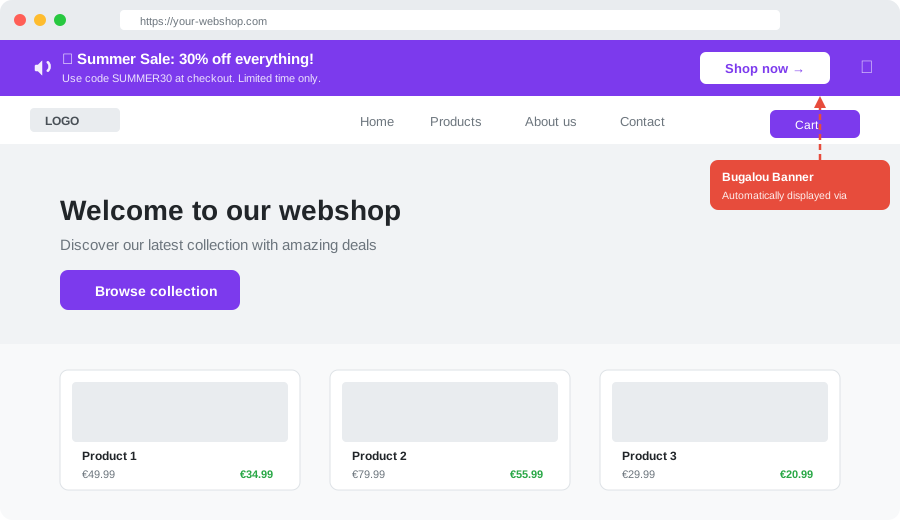
This is what an announcement banner looks like on a website
Banners can be customized with different styles, colors, call-to-action buttons, and multi-language content. They can be targeted to specific pages or audiences.
Key Features
🎯 Targeted Display
Show banners on specific pages, to specific audiences, and at the right time. Configure URL patterns and device targeting to reach exactly who you want.
🎨 Fully Customizable
Customize colors, text, icons, buttons, and placement to match your brand. Choose between inline or floating banner styles, positioned at the top or bottom of the page.
📝 Message & Subtitle
Each banner has a main message (the bold headline) and an optional subtitle (secondary text below the headline). This lets you provide additional context, like a discount code or expiration date.
🌍 Multi-Language Support
Create banners with content in both Dutch (NL) and English (EN). The banner widget automatically detects the language of your website and shows the correct version. If the English text is left empty, the Dutch text is used as a fallback.
Language detection works via:
- The
<html lang="...">attribute on your website - URL path prefix (e.g.
/en/or/nl/) - Default fallback: Dutch
📊 Track Performance
Monitor impressions, clicks, CTR, and dismissals with built-in analytics. See how your banners perform and optimize them over time.
How to Create a Banner
- Go to Campaigns → Banners in your dashboard.
- Click Create Banner and give it a name.
- In the Content tab, use the 🇳🇱 Nederlands / 🇬🇧 English toggle to enter your message, subtitle, and button text in both languages.
- Configure design, targeting, and scheduling using the visual editor.
- Preview your banner in the live preview panel (which updates based on the selected language) and activate when ready.
Banner Styles
- Inline — Sits within the page content, pushing content down
- Floating — Hovers above the page content with a shadow
Positions
- Top — Displayed at the top of the page
- Bottom — Displayed at the bottom of the page
Scheduling & Targeting
You can schedule banners to appear at specific dates and times, and target them based on:
- URL patterns — Show on specific pages (e.g.
/pricing,/blog/*) - Device type — Desktop only, mobile only, or all devices
- Audience — All visitors, new visitors only, or returning visitors only
Installing on Your Website
Add the following script tag to your website to display banners:
<script src="https://bugalou.com/banners/widget.js" data-org="YOUR_ORG_SLUG"></script>The widget automatically handles language detection, page targeting, and tracking — no additional configuration needed.
Available on All Paid Plans
Announcement Banners are available on all paid plans (Starter, Pro, and Enterprise). Upgrade your plan to start using banners.